ApnaPrinter is a complete QR-code based self-service print kiosk system for print shops, Xerox centres, and cyber cafes . Customers scan a QR code to upload and print documents or photos — no app, no login, no manual file transfer.
Turn Your Print Shop Into a
Fully Automatic
Self-Service Kiosk
Customers scan a QR code, upload their file, and print — you just click Approve. No queues, no manual file transfers, no wasted time.
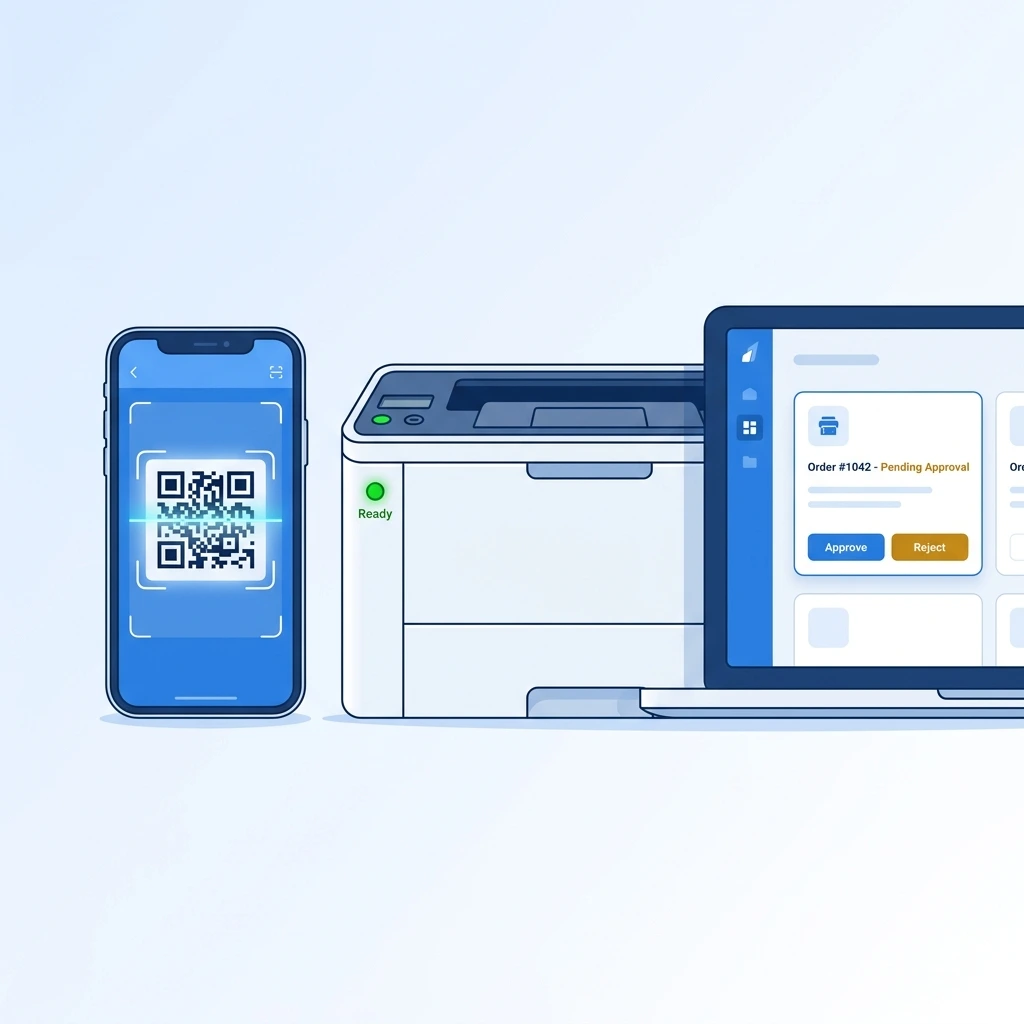
How ApnaPrinter Works
From QR scan to printed document — fully automated in under 60 seconds.
Customer Scans QR Code
Scanning the shop's QR code opens the upload page instantly in the customer's browser — no app download or login required.
Uploads Document & Selects Options
Customer picks copies, B&W or colour, and page range, then submits. The smart interface auto-detects document or image mode instantly.
Shop Owner Approves on Dashboard
The order appears live on the owner's desktop dashboard. One click to Approve — or Reject — with all order details visible at a glance.
Auto-Print & Auto-Delete
The file prints automatically and is permanently deleted from the server the moment it's done — 100% private, zero data retained.
Everything You Need to Run a Smart Print Shop
Powered by an adaptive, AI-driven interface that reconfigures itself in real time based on your order queue — not a one-size-fits-all screen.
Print Order Management
Live Order Dashboard
See every pending order in real time as customers submit them — no refresh needed.
✦ Smart InterfaceFull Order Details
File name, page count, copies, colour mode, and order number — all visible at a glance on each order card.
One-Click Approve & Print
Approve an order and it prints automatically and silently — no further action required from you.
Reject Order
Decline any order with a single click. The customer is notified and the file is immediately deleted.
Auto Print Queue
A background worker prints all approved jobs automatically — no supervision or manual intervention needed.
✦ Adaptive LayoutB&W / Colour Auto-Routing
Connect separate B&W and colour printers — orders automatically route to the correct printer based on the customer's selection.
DOCX Support
Word files (DOCX/DOC) are automatically converted to PDF before printing — no manual conversion needed.
Printer Management
Dedicated B&W Printer Setup
Configure your black-and-white printer once. All B&W orders route to it automatically from then on.
Dedicated Colour Printer Setup
Configure your colour printer separately — colour orders are routed to it without any manual switching.
Test Print Button
Instantly confirm any printer is connected and working with a single test-print tap — no guesswork.
Print Your Shop QR
Print a full A4-size QR code poster for your shop counter or wall — customers scan it to start printing.
Usage & Settings
Monthly Usage Tracking
See the total number of pages printed this month — useful for cost tracking and business insights.
Easy Printer Settings
Simple dropdown-based printer configuration — no technical knowledge required to set up or change printers.
Auto File Cleanup
Uploaded files are deleted automatically after printing — 100% secure customer privacy, no data stored on the server.
Razorpay Online Payments
Built-in Razorpay integration lets customers pay online and place their order instantly — available on both plans, no separate setup needed.
Custom Per-Page Pricing
Set your own price per page for B&W and colour prints separately, right from the software. Change rates anytime — fast, easy, and applies instantly to new orders.
Simple, Transparent Pricing
No hidden charges. Choose the plan that fits your shop.
Starter Plan
Yearly
- Unlimited pages printing
- Live Order Dashboard
- B&W & Colour printer support
- Document & Image printing
- Razorpay online payments
- Cashfree payment Gateway payments
- Custom per-page pricing
- 24x7 customer support
- Fast setup & service
- 7-day money-back guarantee
Lifetime Plan
One Shop
- Unlimited page printing
- Live Order Dashboard
- B&W & Colour printer support
- Document & Image printing
- Razorpay online payments
- Custom per-page pricing
- 24x7 priority customer support
- Fast setup & service
- 7-day money-back guarantee
Unlimited Monthly Plan
Monthly
- Unlimited page printing
- Live Order Dashboard
- B&W & Colour printer support
- Document & Image printing
- Razorpay online payments
- Custom per-page pricing (B&W / Colour)
- 24x7 priority customer support
- Fast setup & service
White Label Plan
one-time payment — lifetime, no renewal
- Full source code included
- Complete installation on your hosting
- Lifetime license — no renewal
- Unlimited customers
- Unlimited pages printing
- Own branding portal (your name, logo & domain)
- Live Order Dashboard & B&W / Colour routing
- Razorpay online payments
- Custom per-page pricing
Print in Seconds — No App, No Login, No Hassle
Walk in, scan, upload, and print. The smart interface auto-detects your file type and sets up the right print options instantly.
Not Just Documents — Print Photos Your Way
Switch to Image Mode and design your own photo page layout before printing.
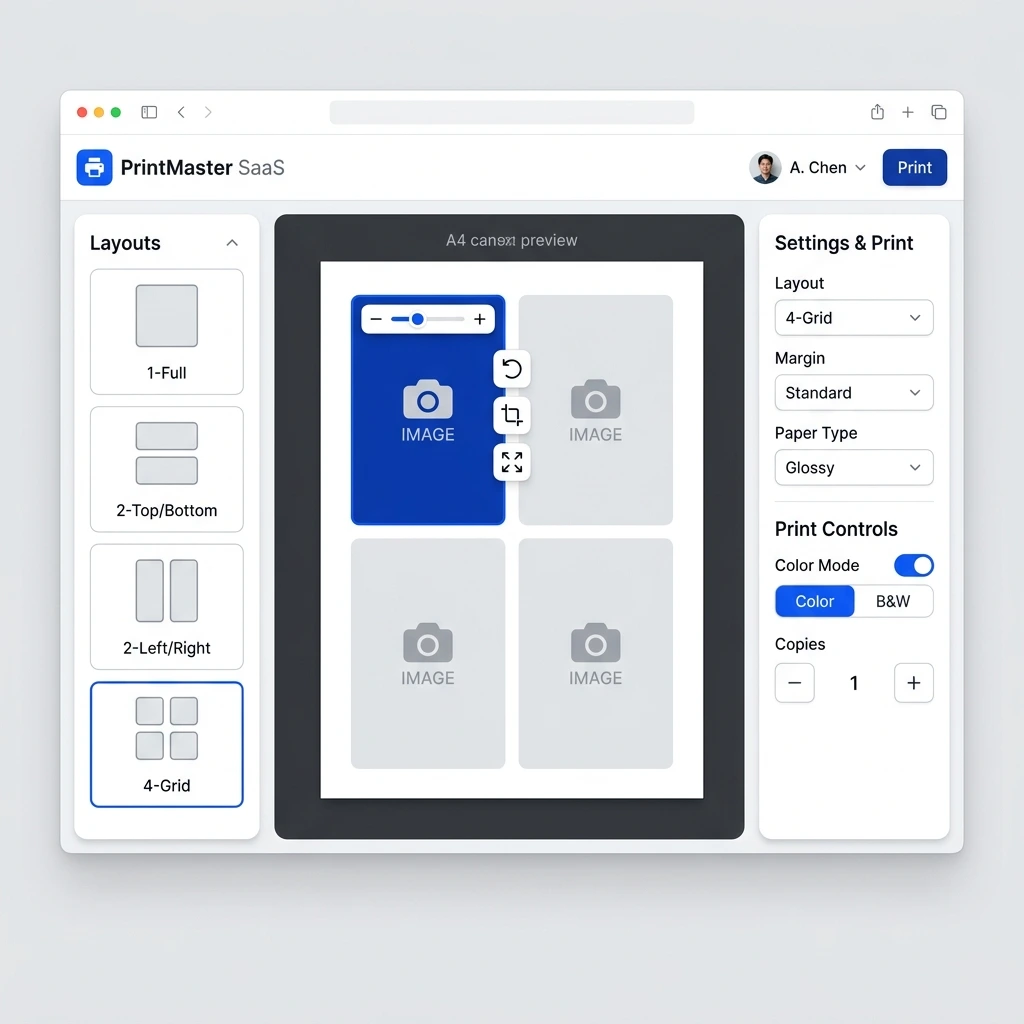
🔀 Mode & Upload
📐 Page Layout Options
✏️ Per-Slot Image Editing
🖨️ Print Controls & Live Preview
India's Leading Auto Printing Software for Print Shops & Cyber Cafes
Everything a print shop owner needs to know about choosing the right QR-code print kiosk software.
What is auto printing software?
How does a QR code print kiosk system work?
Who uses cyber cafe automation software like ApnaPrinter?
How much does print shop management software cost in India?
Frequently Asked Questions
Everything you need to know about ApnaPrinter — answered clearly.
What is ApnaPrinter?
ApnaPrinter is a complete QR-code based self-service print kiosk system designed for print shops, Xerox centres, and cyber cafes. Customers scan the shop's QR code, upload their document or photos, select print options, and submit — the shop owner approves on a desktop dashboard and the file prints automatically. Plans start at ₹600/year.
Do customers need to download an app or create an account?
No — customers simply scan the shop's QR code with their phone camera, which opens the upload page directly in their browser. There is no app to download and no account to create. Just upload the file, select print options, and submit.
What file formats are supported?
ApnaPrinter supports PDF, DOCX, and DOC file formats for document printing, with a maximum file size of 20 MB. Word files are automatically converted to PDF before printing. For image printing, customers can upload multiple images and arrange them on an A4 canvas with full layout and editing controls.
Is customer data safe? Are files stored on the server?
Yes — ApnaPrinter is built with privacy first. Every uploaded file is permanently and automatically deleted from the server immediately after the order is printed or rejected. No files are retained, no customer accounts are created, and no personal data is stored. Customers leave no digital trace behind.
What happens if I reject an order?
If you reject an order, the customer's live status tracker updates to show the rejection instantly. The uploaded file is immediately and permanently deleted from the server. No print is made and no data is retained — the process is clean and instant.
Can I connect two different printers — one for B&W and one for colour?
Yes. ApnaPrinter's B&W / Colour Auto-Routing feature lets you configure a dedicated black-and-white printer and a dedicated colour printer separately. When a customer selects B&W or colour at checkout, the order is automatically routed to the correct printer — no manual switching needed.
What's included in the 7-day money-back guarantee?
If you are not fully satisfied with ApnaPrinter within the first 7 days of your subscription — for any reason — you are entitled to a complete, no-questions-asked refund of your subscription fee. Simply contact our support team within 7 days of purchase to claim your refund.
How fast is setup for a new shop?
Setup is fast and straightforward. Install the ApnaPrinter desktop app on your shop's computer, configure your printer(s) using the simple dropdown settings, and print your shop's QR code poster to place at the counter. Most shops are fully operational within minutes of subscribing.
Can customers print photos, not just documents?
Yes. ApnaPrinter includes a dedicated Image Print Mode where customers can upload multiple photos, choose from several A4 layout options (1-Full, 2-Left/Right, 4-Grid, Custom Grid), and edit each image slot individually with zoom, rotate, crop, and fit controls. A live A4 canvas preview shows exactly how the page will look before printing.
What's the difference between the Starter and Unlimited plans?
All plans include every feature — Live Order Dashboard, B&W & Colour routing, Document & Image printing, and 24x7 support. The only difference is print volume: the Starter plan (₹600/year) includes 1,300 pages per month, while the Unlimited plan has no page limit at all and is available at ₹1,099/year or ₹100/month.
Does ApnaPrinter support online payments?
Yes. ApnaPrinter has Razorpay integrated directly into the software, so customers can pay online — via cards, UPI, wallets, or netbanking — and their order is placed instantly. This is available on both the Starter and Unlimited plans.
Can I set my own price per page?
Absolutely. You can set custom pricing per page separately for black & white and colour prints, directly inside the software. Rates are quick and easy to update anytime, and changes apply instantly to new customer orders. This is available on both plans.
Ready to Automate Your Print Shop?
Join shop owners saving hours every day with ApnaPrinter. Setup in minutes, cancel anytime.
🚀 Free Demo